Dictation
Agents can dictate replies instead of typing them. Speech is transcribed live into the message box, where the agent can correct it before sending.
It works wherever Flex shows a message box: web chat, SMS and WhatsApp.
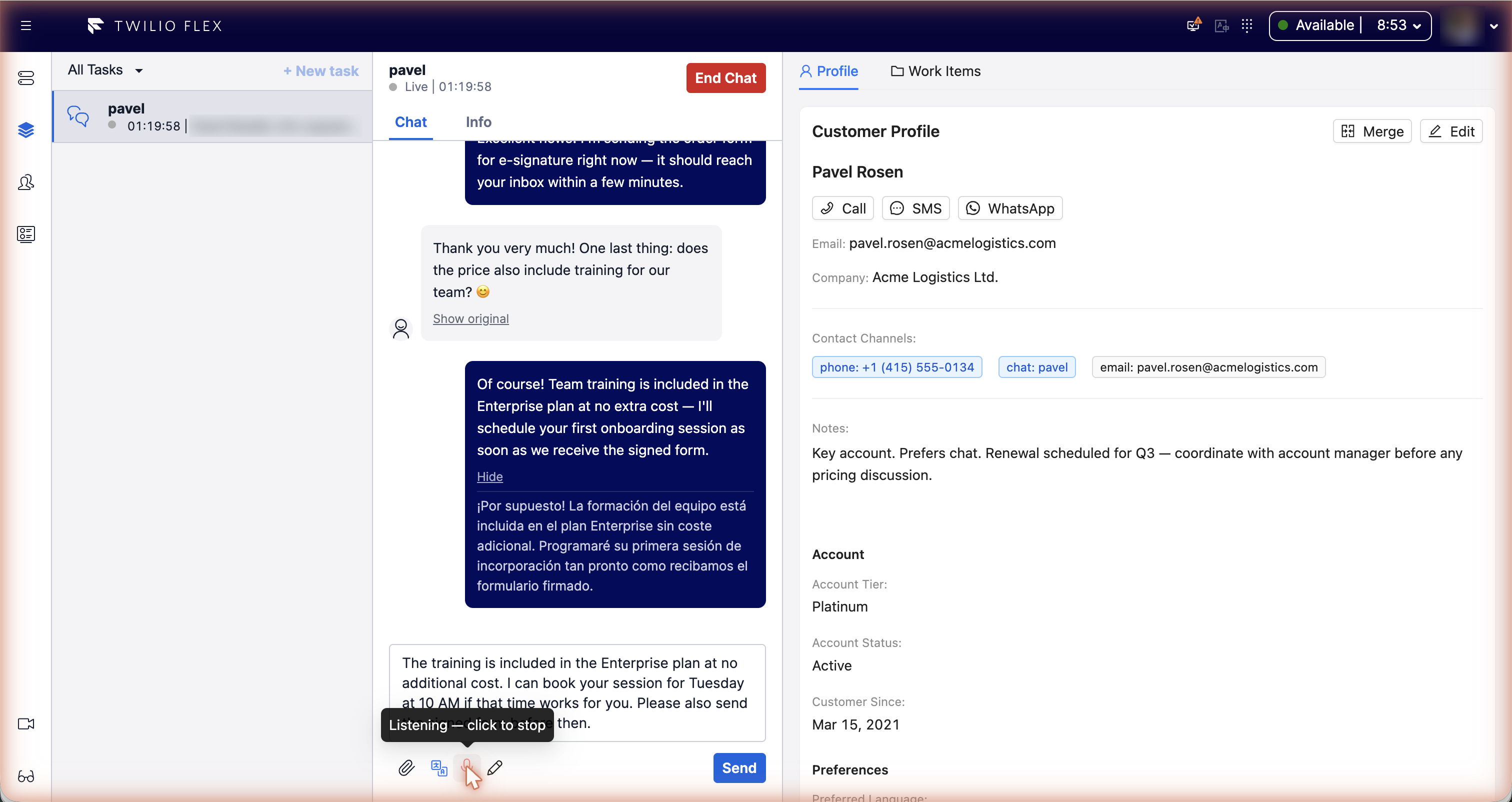
Using it
- Click the microphone button Dictate under the message box, or press Ctrl+Shift+M.
- The first time, the browser asks for microphone access. Allow it.
- While the button shows Listening, speak. The text appears in the message box as you talk.
- Click the button again, or press the shortcut again, to stop.
The dictated text is added after whatever is already in the message box. It is never sent on its own. Switching to another task stops dictation.
The shortcut only acts on the conversation that is open. If the browser blocks the microphone, the agent sees "Microphone access is blocked. Enable it in your browser to dictate."
Languages and vocabulary
- Language hints tell the speech engine which languages to expect. They are set for the whole
contact center (
language_hints, Hebrew and English by default). - Glossary terms (product names, jargon) improve recognition of words the engine wouldn't know.
Set them for everyone with
glossary, or per agent with the worker attributestt_glossary(a list of strings). The two lists are combined. There is no screen for editing them; set the worker attribute in TaskRouter.
Speech engines
Cloud speech service (default)
Dictation streams audio from the browser directly to the real-time speech service (Soniox) configured for your installation. The browser never holds the account key for that service: it gets a temporary key from Floor Walker (valid 10 minutes by default, 60 to 3600 seconds allowed) and refreshes it in the background.
Self-hosted
Set provider to self-hosted to use your own WhisperLive speech server. Only the first
language hint is used, and the glossary is passed as an initial prompt.
Configuration
Under custom_data.features.speech_to_text in the Flex configuration:
| Key | Default | Meaning |
|---|---|---|
enabled | false | Turns the feature on. |
provider | soniox | soniox or self-hosted. |
model | stt-rt-v4 | Real-time speech model of the default service. |
language_hints | ["he", "en"] | Expected languages. |
glossary | [] | Terms for everyone; combined with the worker attribute stt_glossary. |
shortcut | ctrl+shift+m | Start/stop shortcut. Modifiers: ctrl, shift, alt (option), cmd (meta, win). |
token_ttl_seconds | 600 | Lifetime of the temporary speech-service key (60 to 3600). |
self_hosted_ws_url | "" | Address (WebSocket URL) of the self-hosted server; may contain {token}. |
self_hosted_model | "" | Model name for the self-hosted server (small if empty). |
self_hosted_token_url | "" | Optional URL that returns a token for the self-hosted server. |
api_url | the screen_recording address | Floor Walker service address, if different. Set during installation. |