Real-time translation
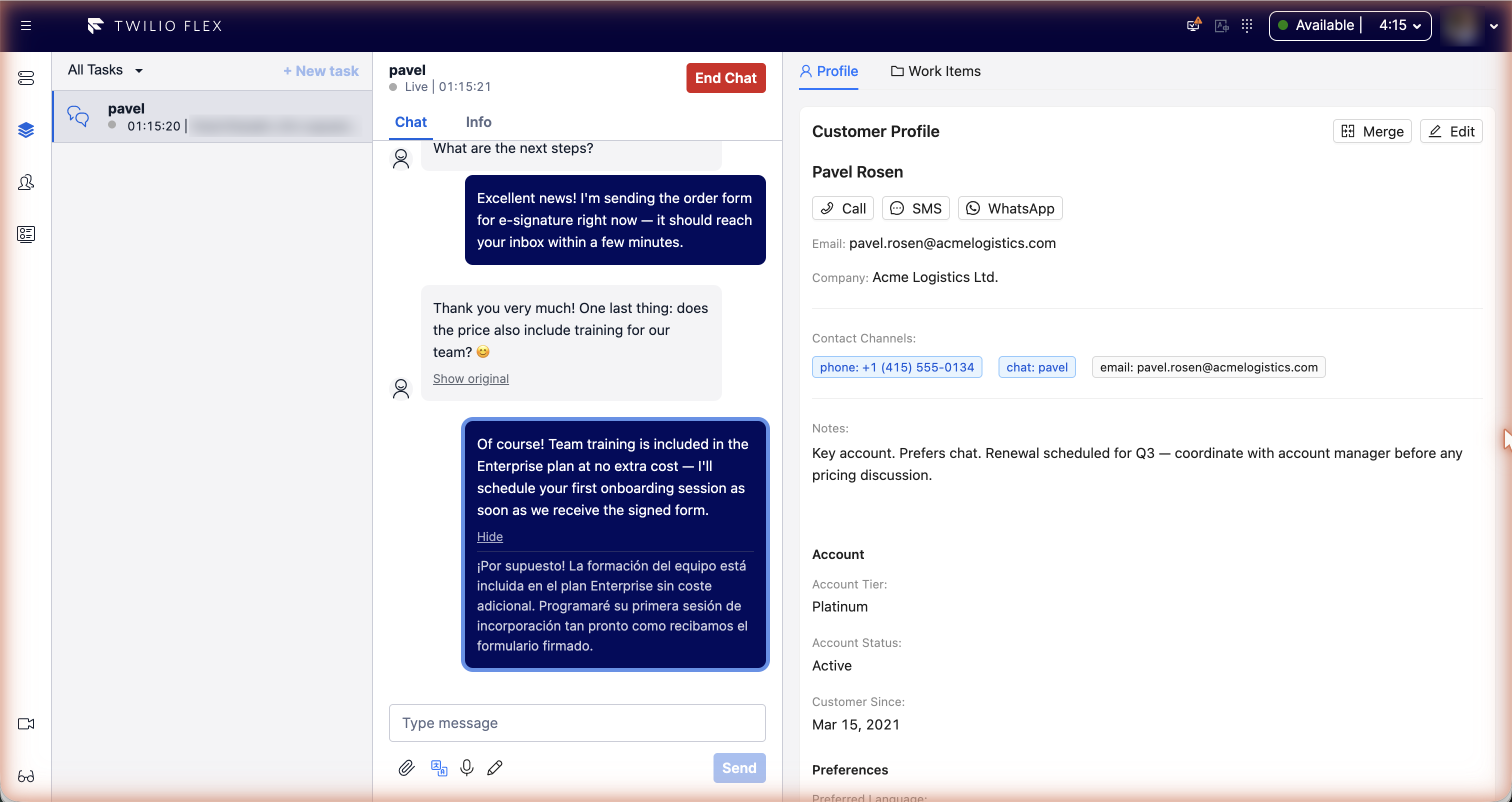
Agents and customers can write in different languages. Customer messages are translated into the agent's language as they arrive; the agent's replies are translated into the customer's language before they are sent. The original text is always one click away.
Translation works in messaging conversations (web chat, SMS, WhatsApp). It does not apply to calls.
Turning it on for a conversation
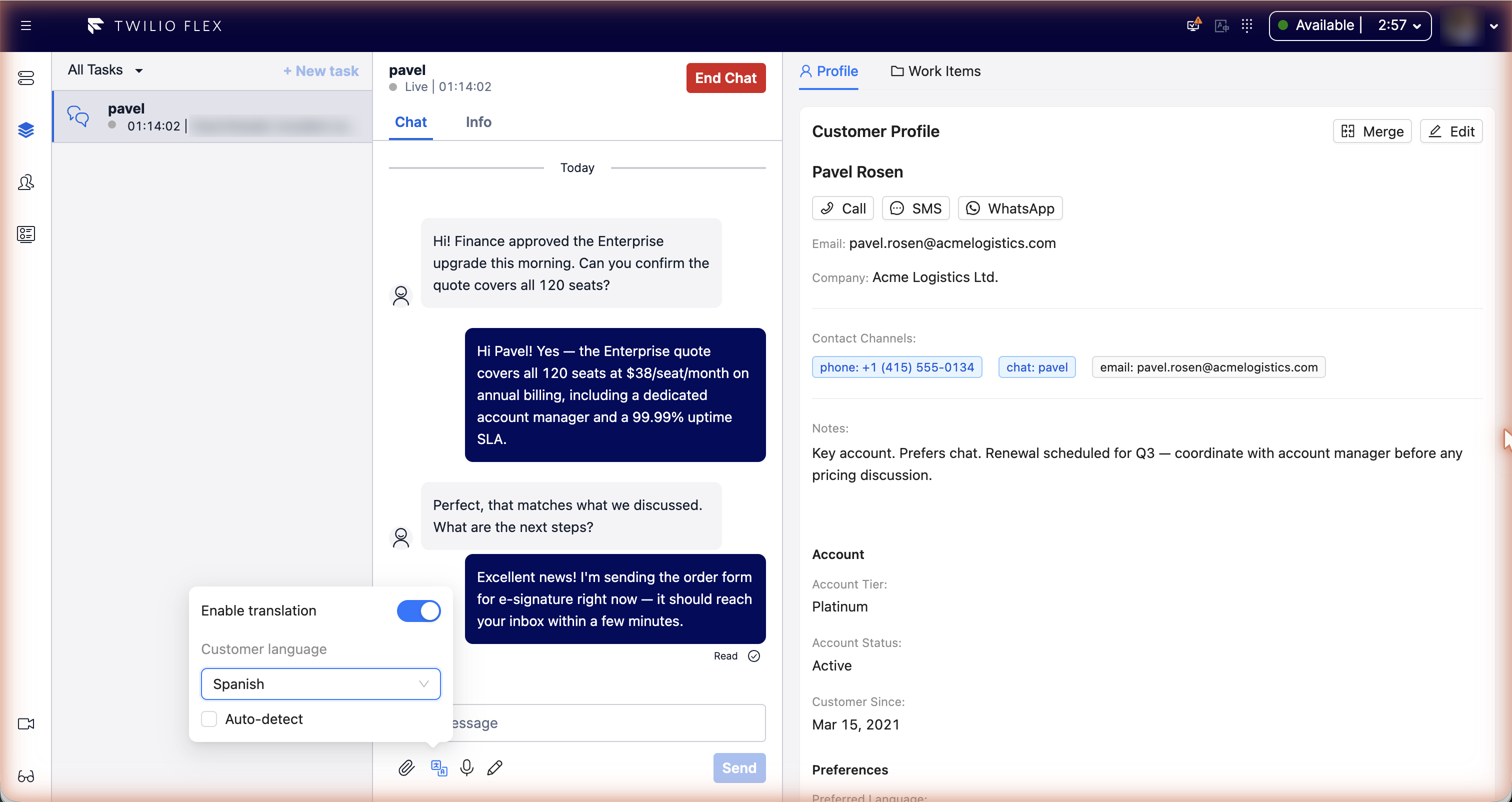
The Translation button sits under the message box. It opens a popover with:
- Enable translation: turns translation on or off for this conversation.
- Customer language: the language replies are translated into. Pick one, or leave it empty and tick Auto-detect to take it from the customer's first message in another language. (Admins can hide the language choice.)
The settings are saved on the conversation, so they survive a page reload and stay with the conversation when it is transferred.
What happens to messages
Customer messages
- A message is translated only if it isn't in one of the agent's languages. The language is detected in the browser first (from the script for Hebrew, Arabic, Cyrillic, Greek, Chinese, Japanese, Korean, Devanagari, Thai and Ethiopic, and statistically for Latin-script text). Short or ambiguous Latin-script messages are left untranslated.
- The translation is shown as the message text, with Translated from the language and Show original / Hide under it.
- Translations are saved on the conversation, so reopening it doesn't translate again.
Agent replies
- When translation is on and a customer language is set, the reply is translated just before it is sent. The customer receives the translation; the agent keeps seeing what they wrote, with Sent in the language and Show sent message to see exactly what went out.
- Replies that already look like the customer's language are sent as they are.
- If translation fails, the original message is sent and the agent is warned: "Could not translate your message; it was sent untranslated."
- Messages longer than
max_chars(5000 by default) are not translated.
Context and style
The last six messages of the conversation are sent along as context so pronouns and tone come out right; they are not translated themselves. The model is told to keep a professional support tone and to leave names, brand names, order numbers, codes, URLs and email addresses unchanged.
The agent's languages
Each agent has a list of languages they read. Messages in those languages are never translated, and the first one is the language customer messages are translated into.
Agents set it themselves: the Translation settings button in the Flex header opens a drawer with
My languages. This is saved on the agent's TaskRouter worker as the attribute
translation_known_languages, a list of two-letter codes, for example ["en", "es"].
Users with the Flex admin role also see Contact center languages in that drawer: the default
languages for agents who haven't set their own.
The agent's interface language (the worker attribute language) does not affect translation.
Available languages: Hebrew, English, Arabic, Russian, Ukrainian, French, Spanish, Portuguese, German, Italian, Romanian, Amharic, Tigrinya, Greek and Chinese.
Configuration
Under custom_data.features.conversation_translation in the Flex configuration:
| Key | Default | Meaning |
|---|---|---|
enabled | false | Turns the feature on. |
default_agent_languages | ["he"] | Agent languages used when neither the agent nor the contact center has set any. |
allow_customer_language_override | true | Lets agents choose the customer language. |
auto_detect | true | Auto-detect the customer language by default. |
supported_languages | all | Limits the language lists to these codes. |
max_chars | 5000 | Longer messages are not translated. |
context_window | 6 | Earlier messages sent as context; 0 turns context off. |
api_url | the screen_recording address | Floor Walker service address, if different. Set during installation. |
Translation uses the language model configured for your Floor Walker installation. If no AI service is configured, messages pass through untranslated.