A Flex Insights alternative: historical reporting on data you own
Floor Walker Reports gives a Twilio Flex contact center historical reporting from its own TaskRouter and Studio events, kept by Floor Walker in the environment you choose: hosted for you by us, or in your own cloud or data center. A call shows up in the reports seconds after it ends, service levels are defined per queue by your supervisors, and every IVR journey is joined to the contact. You can use it in place of Flex Insights, and take the data out to Excel, CSV, nightly open data files, your own BI tool or an AI assistant.
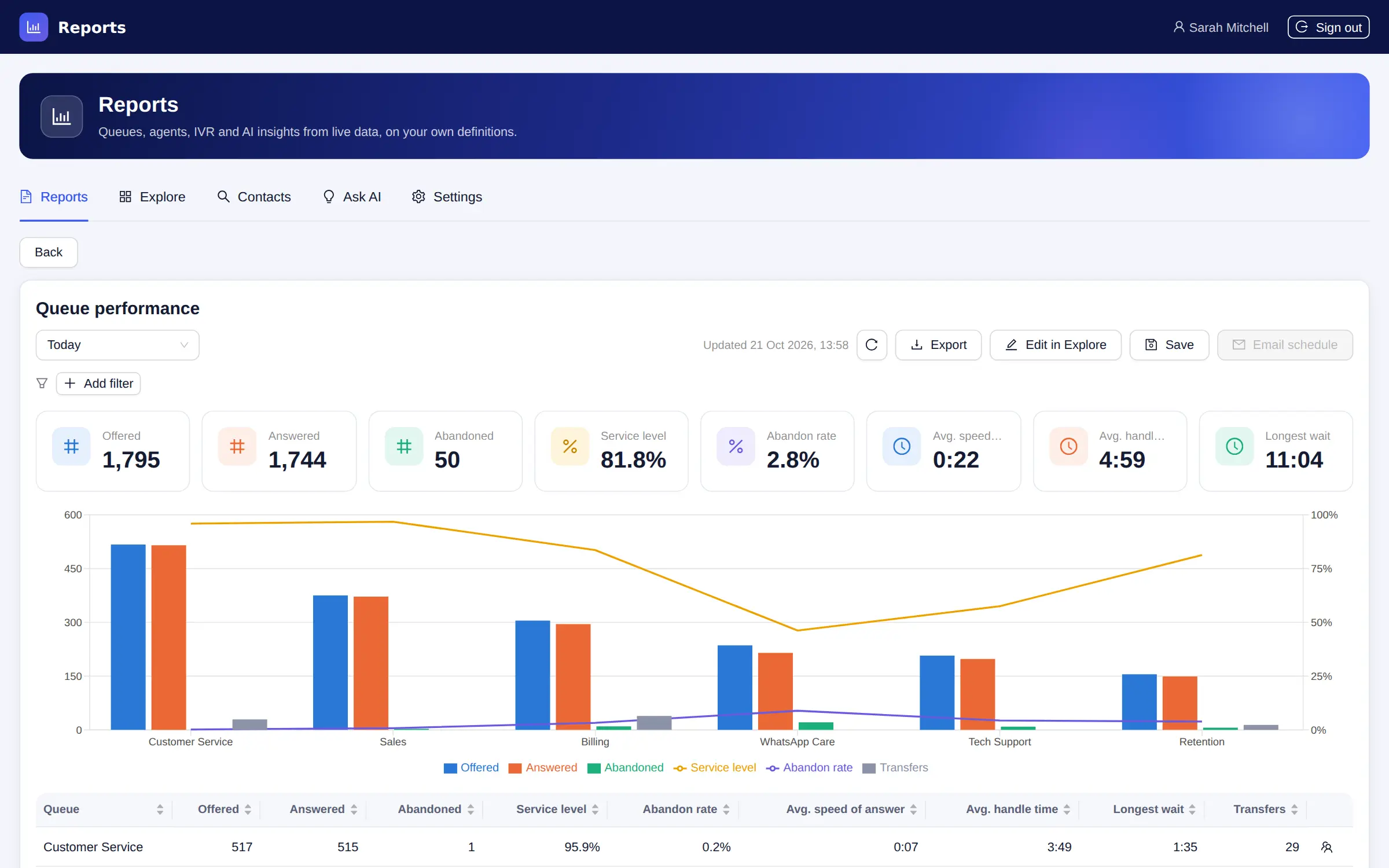
What you get
- Standard reports. Contact center overview, queue performance, 15-minute queue intervals, busiest hours, abandon analysis, agent and team performance, agent time by activity, IVR containment, where callers leave the IVR, wrap-up outcomes, repeat contacts, outbound results, customer sentiment, top topics, coaching and QA, and cases.
- One metric registry. Reports, the wallboards and the supervisor console count with the same metric definitions, so the same metric over the same period is the same number on every screen.
- Explore. Build a report from up to 20 metrics, up to four groupings and a time breakdown from 15 minutes to a month, shown as a table, line, bars, stacked bars, pie or numbers.
- Every contact end to end. Search contacts by customer number or address, then open one to see its IVR steps, each queue and agent leg (wait, ring, talk, hold, wrap-up), milestones, the AI summary and sentiment, and the recording.
- Per-queue service levels. Supervisors set the answer threshold, target and short-abandon threshold per queue. Changing a threshold re-evaluates the stored history, so past reports use today's definition.
- Custom report fields. Any task attribute becomes a grouping and filter, with no limit on the number of fields or their length.
- IVR and Studio journeys. Every Studio execution becomes a journey with one step per widget and an exit type: handed off, contained, abandoned in the IVR or error. No changes to your flows are needed.
- Saved reports and email schedules. Save reports privately or share them with every supervisor, and email them daily, weekly or monthly as Excel or CSV, in English or Hebrew, to up to 50 recipients.
- Exports. Any report to Excel or CSV on demand, and optional nightly Parquet and gzipped CSV files of every report data set, in one folder per day that your warehouse can read.
- Your own BI. A read-only reporting connection for Power BI, Tableau, Looker or Metabase, an optional Metabase hosted next to Floor Walker with a starter dashboard, and a reporting API.
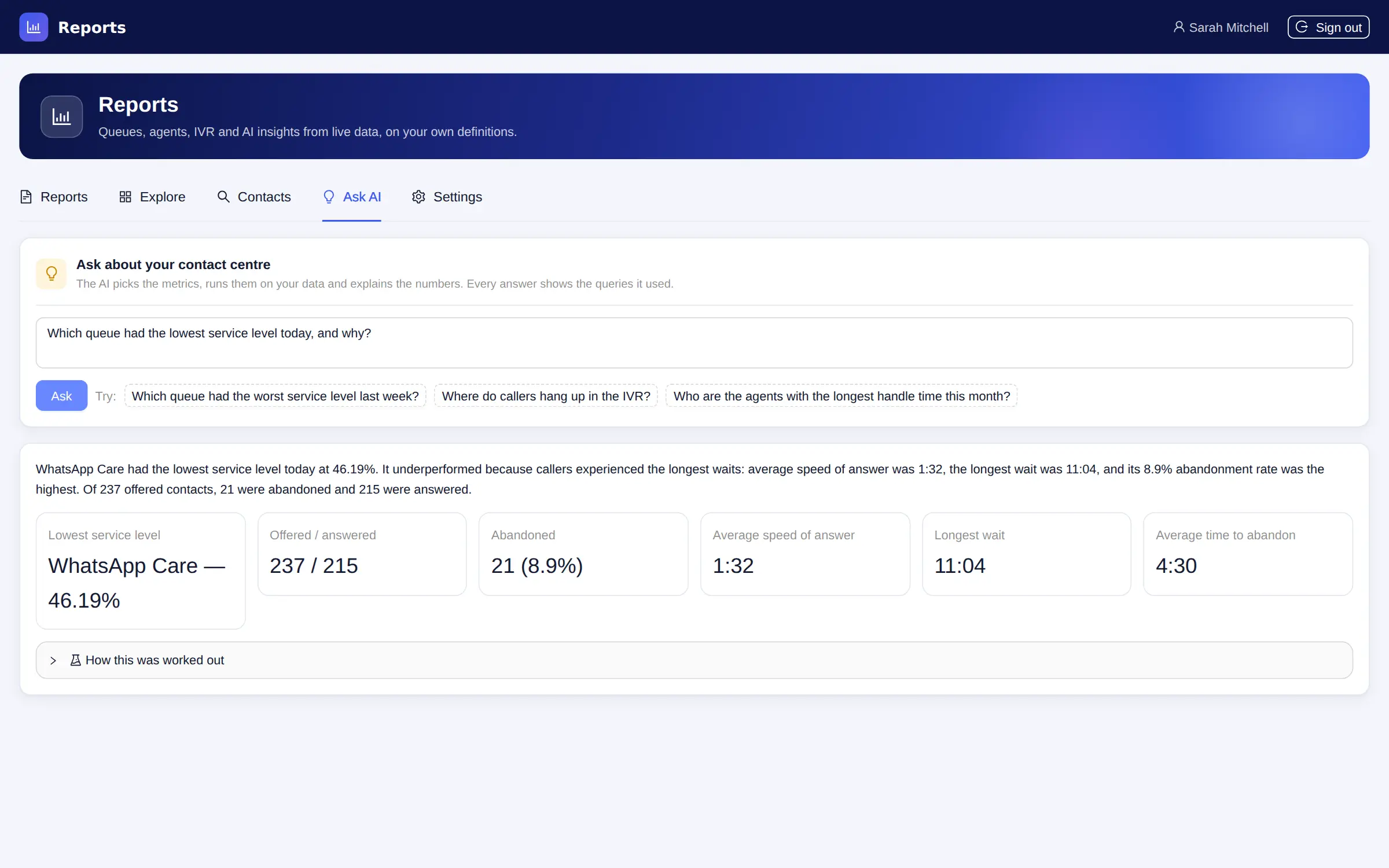
- Ask AI and MCP. Ask a question in plain words and get an answer with the queries and numbers behind it. An MCP server lets AI assistants such as Claude query the reports with the caller's permissions.
- Agents see their own numbers. Agents get My performance, My time and their own contacts; Floor Walker enforces this on every request.
How it works
Twilio sends your contact center's TaskRouter and Studio events to Floor Walker as they happen, through Event Streams in your Twilio account. Floor Walker stores them on arrival as queue visits and agent legs (wait, ring, talk, hold, wrap-up), contacts, IVR journeys and 15-minute intervals, and decides the business rules (offered, abandoned, within service level) once, so every report, export and screen counts the same way. Hold time comes from the voice conference, which the Flex plugin asks Twilio to report. A backfill imports the last 30 days of TaskRouter events when you start.
Reports appear in the Flex side navigation and in a reports console in a browser tab, for people who want reports without opening Flex; both sign in with the Flex login, and agents see only their own numbers. Report data is kept for 25 months by default.
The Floor Walker service that keeps the report data is hosted for you by us in a dedicated environment, or installed in your own cloud or data center so it never leaves your environment. The product is the same either way, with data encrypted in transit and at rest.
Who it is for
- Twilio Flex contact centers that want today's numbers to be seconds old and the same on the wall, at the supervisor's desk and in the monthly report.
- Teams with Studio IVRs or bots who need to see containment and where callers drop out before they reach a queue.
- Analysts who want the raw facts in their own warehouse or BI tool.
- Hebrew-speaking teams: every screen, email and export is available in English and Hebrew, right-to-left included.
Frequently asked questions
What is a good alternative to Flex Insights?
Floor Walker Reports covers historical reporting for Flex from the same TaskRouter events, plus Studio IVR journeys, and keeps the data in your own Floor Walker environment, hosted for you or in your own cloud or data center. It includes standard reports, a report builder, contact drill-downs, scheduled emails, exports and an AI question box, inside Flex or in a browser tab.
How fresh is the data?
Events are folded into the reporting tables as Event Streams delivers them, so a contact appears seconds after it ends. The Today view refreshes every minute, and the 15-minute intervals are brought up to date every minute.
Can I keep my existing Flex history?
TaskRouter keeps 30 days of events, and Floor Walker can import those 30 days with one button in the report settings. IVR journeys and hold times start from the day Event Streams starts delivering them. History older than 30 days stays in Flex Insights or its export.
Can I report on what callers do in the IVR?
Yes. Every Studio execution becomes a journey joined to the contact by its call or conversation SID, with containment rate, IVR abandon rate and the widget where callers hung up. Caller input is not stored by default, because it can hold card or ID numbers; you can store it for chosen widgets such as a main menu.
Can I use Power BI, Tableau or Metabase on the data?
Yes. A read-only reporting connection lets Power BI, Tableau, Looker or Metabase work on the reporting data, and teams without a BI tool can have Metabase hosted next to Floor Walker with a starter dashboard. Nightly Parquet and CSV files can feed a data warehouse, and the reporting API serves the same metrics on demand. The connection is set up on request and is never exposed on a public address.
How does Ask AI answer questions without making up numbers?
The model plans up to three structured queries against the metric catalog, the queries run like any report with the asking user's permissions, and a second step writes the answer from the numbers that came back. The model never writes code or database queries, and each answer shows the queries it ran so it can be checked.
Learn more
- Reports overview
- Using reports and the metrics catalog
- IVR and Studio journeys
- Exports and Your own BI tools
- Ask AI and MCP
- Setup and backfill
Book a demo: hello@floorwalker.dev