A supervisor console for Twilio Flex
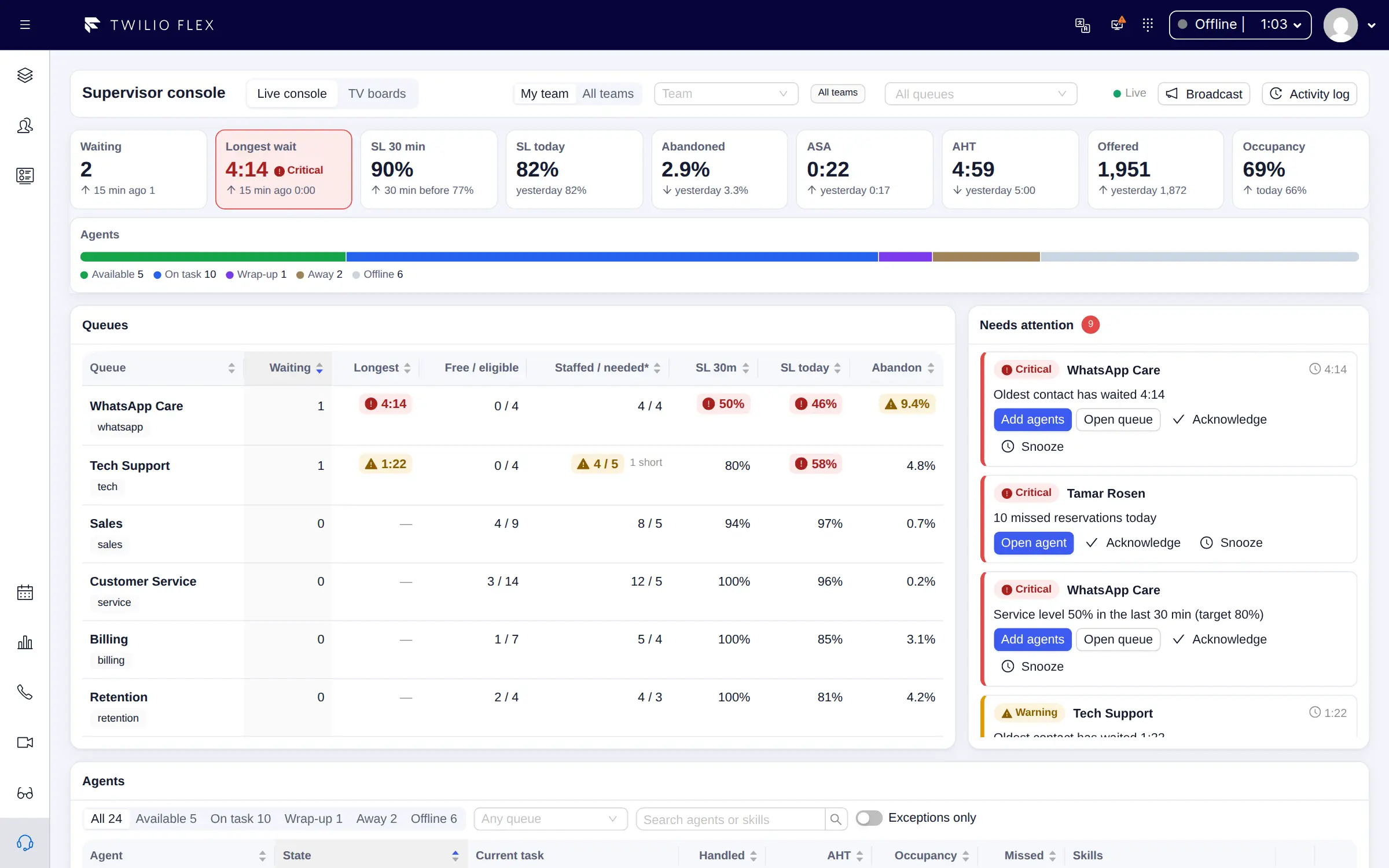
Floor Walker adds a supervisor console to Twilio Flex: one screen in the Flex side navigation that shows every queue and agent live, estimates how many agents each queue needs with Erlang C, lists what needs attention right now, and lets supervisors change an agent's activity, skills and channel capacity without leaving the page. Every change is recorded in an audit trail, and a broadcast puts a message on every wallboard in the room.
What you get
- The live floor. A pulse strip with waiting, longest wait, service level over 30 minutes and today, abandon rate, ASA, AHT, offered and occupancy, each against a comparison (15 minutes ago, or yesterday at the same time of day). The console refreshes every 5 seconds.
- Queues with staffing estimates. One row per queue with waiting, longest wait, free and eligible agents, staffed / needed, service level, abandon rate, ASA, AHT and a sparkline of the last hour.
- Erlang C staffing. For each queue, the agents needed to reach its service level target at the current load, the projected service level with the agents working now, and how many agents short the queue is. Hover the cell to see the reasoning.
- Needs attention. Service level breaches, long waits, queues with nobody working, wrap-up and away overruns, long tasks, missed reservations and dialer campaigns over their abandon target. Each item offers the action that usually fixes it, and can be acknowledged or snoozed; acknowledgements are shared.
- Agent and queue drill-downs. An agent's day as an activity timeline, tasks handled, AI summaries of recent conversations and the changes supervisors made to them. A queue's waiting contacts with live wait timers, its agents and today in 15-minute intervals.
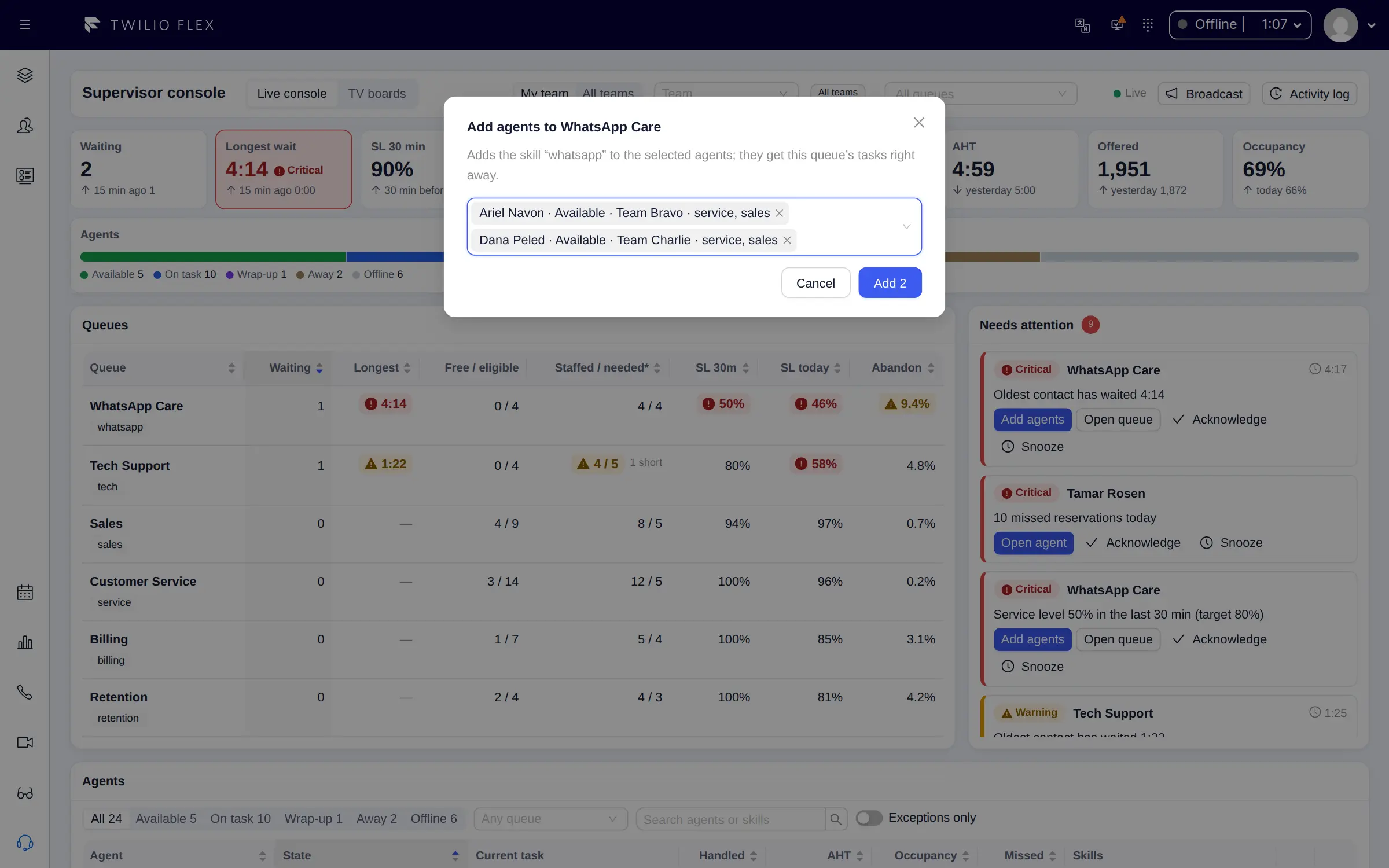
- Actions on workers. Set any TaskRouter activity, edit Flex routing skills and levels, and change each channel's capacity (0 to 50) or turn a channel off for an agent. Add agents gives selected agents a queue's skill from the attention item.
- Audit trail. Activity, skill and channel changes and broadcasts are recorded with who, when, the values before and after, and whether TaskRouter accepted the change.
- Broadcasts. A banner of up to 200 characters on the chosen wallboards, at info, warning or critical level, for 30 minutes, an hour, four hours or until cleared.
- Your scope. My team, all teams or chosen queues, remembered for each supervisor.
- More on the same screen. Today in 15-minute intervals against yesterday, unhappy customers from the last hour (from the AI analysis), and dialer campaigns with pause, start and priority controls when the outbound dialer is installed.
How it works
The console is a feature of the Floor Walker plugin in your own Twilio Flex account, shown to users with
the Flex supervisor or admin role. It reads the same live data as the
Floor Walker wallboard: live TaskRouter statistics for queues and agent
states, and Twilio Event Streams for today's numbers. The windowed numbers use the reports' metric definitions and
per-queue service level settings, so a number at the supervisor's desk matches the same number on a TV
and in a report over the same period.
Actions are made in TaskRouter by Floor Walker, which checks the supervisor's Flex sign-in and role on every request. When editing skills, only the skills and their levels change; the rest of the worker's attributes are written back as they were. If TaskRouter refuses a change, the console shows TaskRouter's reason, nothing changes, and the attempt is still logged.
All supervisors share one computation per 5-second slot, so many open consoles do not multiply the load. Floor Walker is hosted for you or installed in your own cloud or data center; see Your cloud or ours.
Who it is for
- Supervisors on Twilio Flex who want to see what needs attention and fix it from the same screen.
- Operations managers who need staffing estimates per queue during the day.
- Contact centers that need a record of who changed an agent's activity, skills or capacity, and when.
FAQ
How do I see how many agents a Twilio Flex queue needs right now?
Floor Walker's supervisor console shows staffed / needed for every queue, using Erlang C with the arrivals of the last 30 minutes, the queue's handle time and its service level target. The console labels it as an estimate and never raises an attention item from it alone, because Erlang C is noisy on small queues.
Can a supervisor change an agent's skills or activity from Flex?
Yes. From the agent row or the agent panel, a supervisor can set the agent's activity, edit their routing skills and levels, and change channel capacity. Moving an agent to an unavailable activity asks for confirmation first, and every change is audited.
Who can use the supervisor console?
Users with the Flex supervisor or admin role. Roles come from Flex, so there is nothing to
configure in Floor Walker itself. Changing the console's colour limits and attention rules needs admin.
Can supervisors act on agents outside their own team?
Yes. The team scope is a view filter, not a permission: a supervisor can act on every agent.
Are changes made in Flex's own Teams view in the audit trail?
No. The audit trail covers changes made from the console, failed attempts included. Changes made directly in TaskRouter or in Flex's own Teams view are not in it.
Learn more
Book a demo: hello@floorwalker.dev