Live translation, AI Compose and dictation in Twilio Flex
To translate Twilio Flex chats in real time, add Floor Walker: customer messages are translated into the agent's language as they arrive, and the agent's replies are translated into the customer's language just before they are sent, with the original always one click away. Next to translation, Floor Walker puts AI Compose (rewrite a draft in one click) and dictation (speech-to-text in more than 60 languages) in the same message box, for web chat, SMS and WhatsApp.
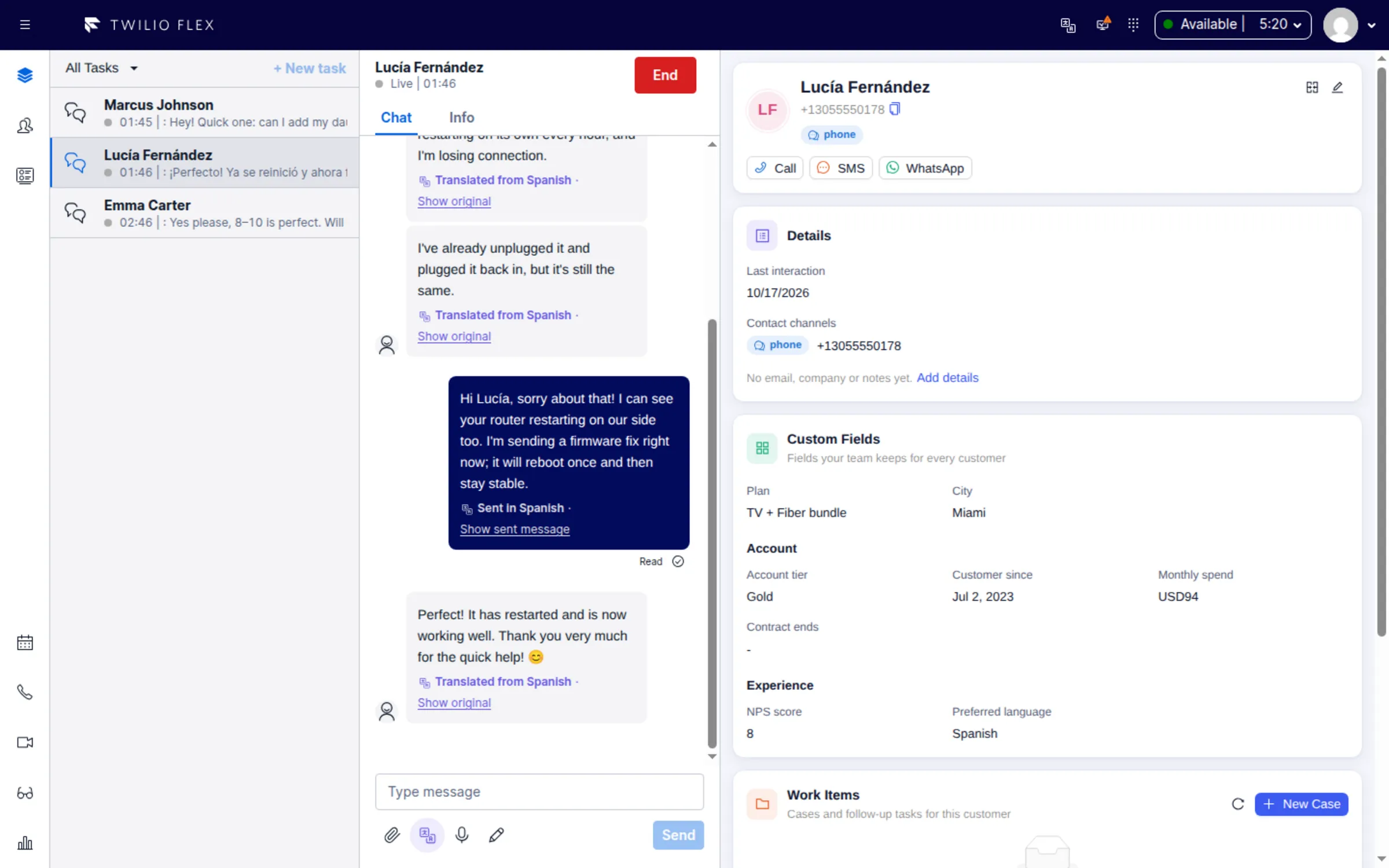
What you get
Two-way translation
- Per conversation. A Translation button under the message box turns translation on, and sets the customer's language or detects it from their first message. The setting stays with the conversation after a reload or a transfer.
- Incoming messages. A message is translated only if it is not in one of the agent's languages. The agent sees the translation with Translated from and Show original.
- Outgoing replies. The customer receives the translation; the agent keeps seeing what they wrote, with Show sent message to check exactly what went out. Replies already in the customer's language are sent as they are.
- Context and care. The last six messages go along as context so pronouns and tone come out right. Names, brand names, order numbers, codes, URLs and email addresses are left unchanged.
- Each agent's languages. Agents list the languages they read; admins set contact-center defaults. Pickers offer Hebrew, English, Arabic, Russian, Ukrainian, French, Spanish, Portuguese, German, Italian, Romanian, Amharic, Tigrinya, Greek and Chinese.
- Safe failure. If a translation fails, the original reply is sent and the agent is told.
AI Compose
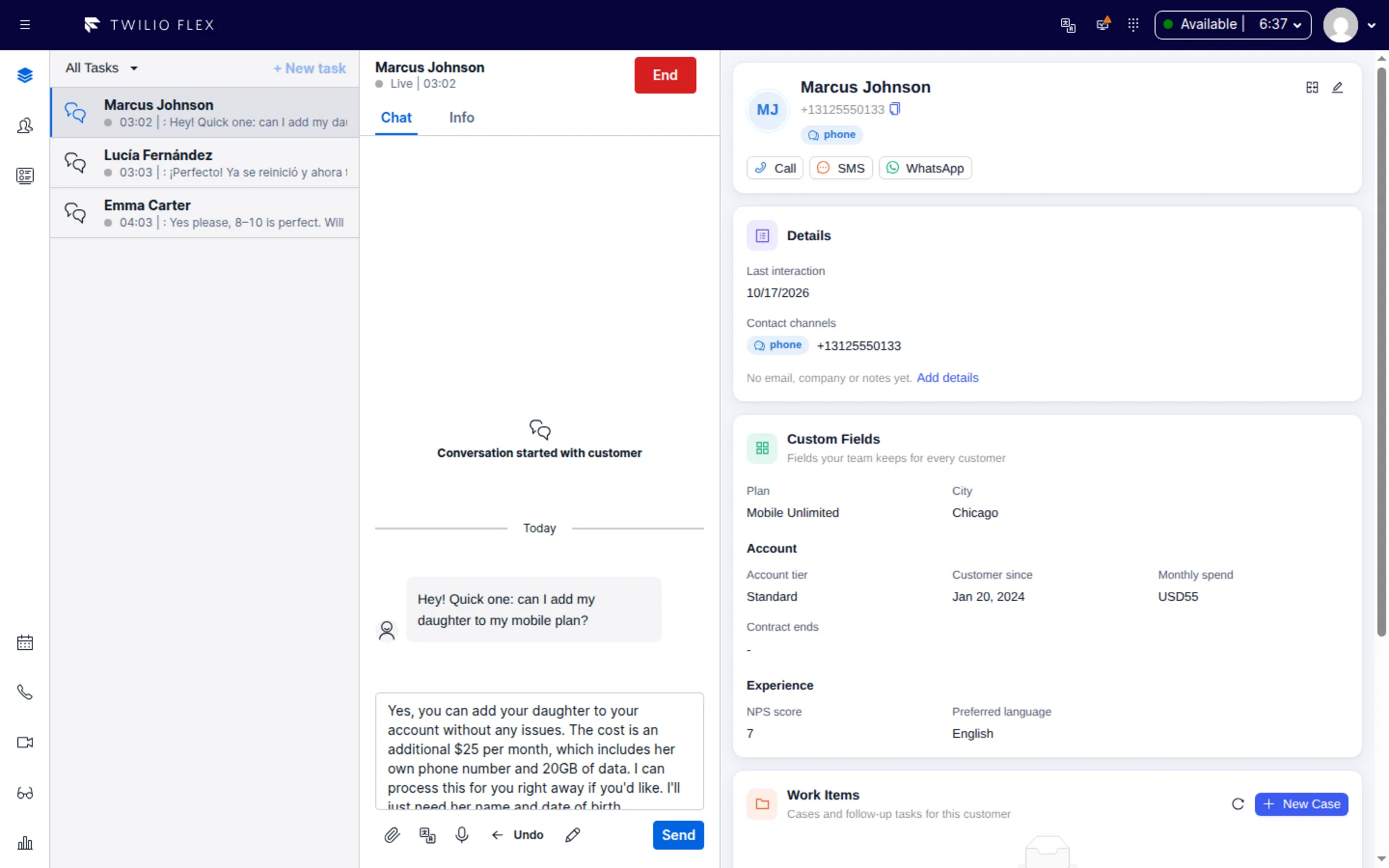
- Rewrite with AI turns a rough draft into a reply ready to send, in five modes: Polish, Shorten, More formal, Friendlier and Fix grammar.
- The rewrite stays in the draft's language and keeps names, numbers, URLs and emoji. Nothing is sent automatically, and Undo restores the previous draft for 10 seconds.
Dictation
- Click Dictate or press Ctrl+Shift+M and speak; the text appears in the message box as you talk. It is never sent on its own.
- Speech-to-text in more than 60 languages, with contact-center language hints and a glossary for product names and jargon, set for everyone or per agent.
How it works
The three tools are part of the Floor Walker plugin in your own Twilio Flex account and are turned on separately in the Flex configuration. Translation and AI Compose send the text, with the agent's Flex sign-in, to Floor Walker, which uses the language model configured for your installation. Dictation streams audio from the browser to the real-time speech service configured for your installation, with a temporary key from Floor Walker, so the browser never holds the account key. Dictation can also use a speech server you run.
Floor Walker is hosted for you or installed in your own cloud or data center, and traffic is encrypted in transit. See Your cloud or ours.
Who it is for
- Contact centers whose customers write in more languages than the agents on shift can read.
- Teams that want to hire for skill and let translation cover the language gap in messaging.
- Agents who handle many chats at once and want faster, cleaner replies by typing or speaking.
FAQ
Can Twilio Flex agents chat with customers in a language they don't speak?
With Floor Walker, yes, in messaging conversations. The agent reads and writes in their own language, and the customer reads and writes in theirs. Translation applies to web chat, SMS and WhatsApp; it does not translate calls.
How does Floor Walker know the customer's language?
The agent can pick it, or leave Auto-detect on to take it from the customer's first message in another language. Detection runs in the browser first: by script for languages such as Hebrew, Arabic, Greek, Chinese and Amharic, and statistically for Latin-script text. Short or ambiguous Latin-script messages are left untranslated.
Can the agent see what the customer actually wrote?
Yes. Every translated message has Show original, and every translated reply has Show sent message. Translations are saved on the conversation, so reopening it does not translate again.
Does AI Compose send messages on its own?
No. AI Compose replaces the draft in the message box; the agent checks it, edits it if needed and sends it as usual. It never translates: use translation for that.
Which languages does dictation support?
Speech-to-text covers more than 60 languages. Admins set language hints for the contact center and a glossary of terms the speech engine would not otherwise know.
Which AI model does translation use?
The language model configured for your Floor Walker installation; ask us if you need a different one. If no AI service is configured, messages pass through untranslated and drafts come back unchanged. See Security and data for how conversation text is handled.
Learn more
Book a demo: hello@floorwalker.dev