A CRM inside Twilio Flex
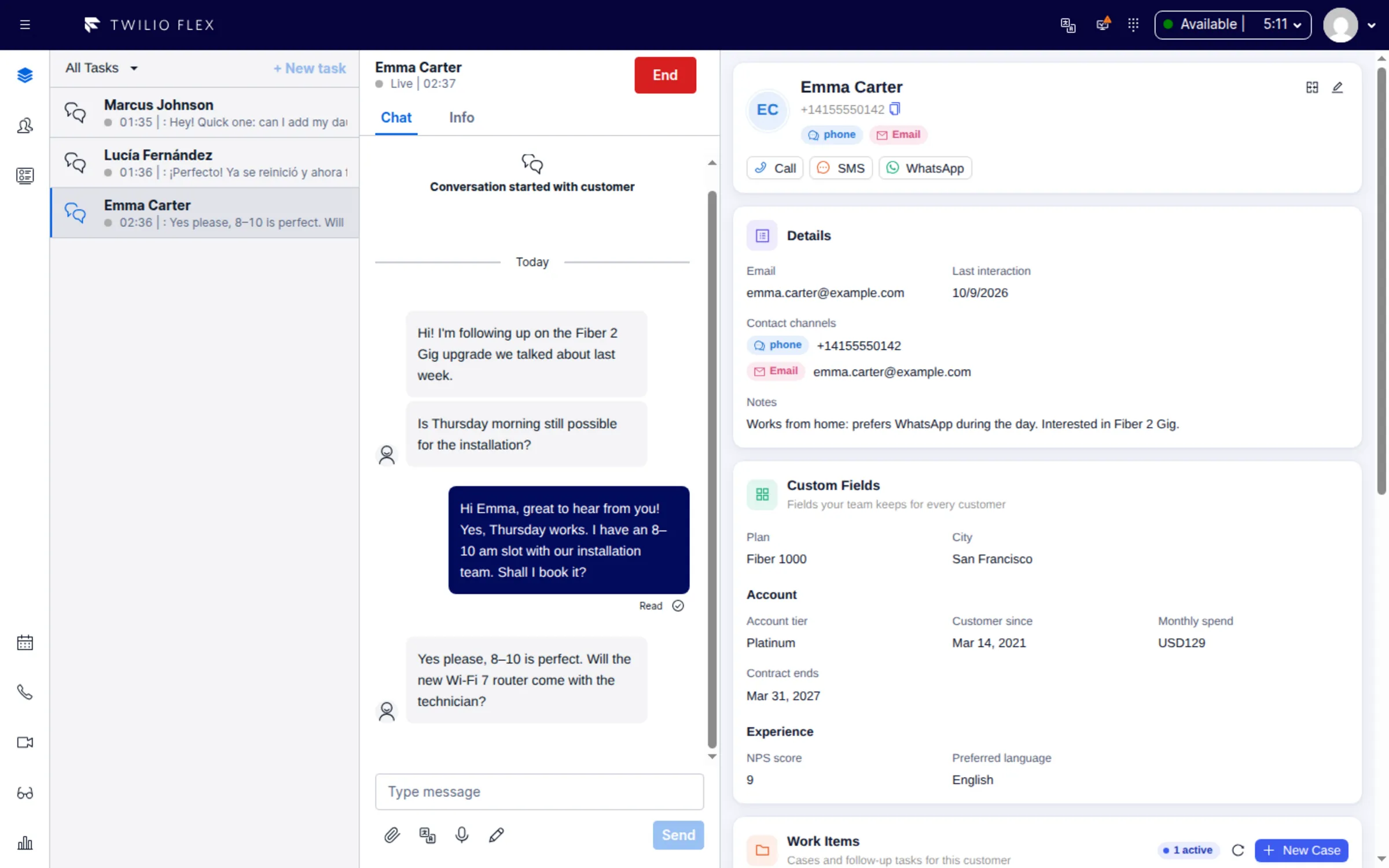
Floor Walker adds a customer CRM to the Twilio Flex agent desktop. When a call, chat, SMS or WhatsApp task arrives, the panel next to it shows the customer's profile, every contact channel on file, custom fields, open cases and tasks, and recent interactions with AI summaries. Customers are recognized across channels, unknown contacts become profiles automatically, and follow-up reminders come back to agents as real Flex tasks.
What you get
- The customer, opened with the task. For voice, chat, SMS, WhatsApp and web chat tasks, a panel to the right of the task shows the customer's identity, details, custom fields, work items and the last 10 interactions. It takes the place of the standard Flex CRM area.
- Identity resolution across channels. Each phone number, email address or chat identity (an alias) belongs to exactly one customer. Identifiers are normalized, so a WhatsApp contact and a call from the same number find the same person.
- Profiles for unknown contacts. If no customer matches, a profile is created when the agent accepts the task, marked for verification so the agent can fill in details or merge it with an existing customer.
- Merging duplicates. Merge two profiles from the panel; the surviving profile receives every contact channel, interaction, case, task and recording of the other.
- Custom fields, no deploys. Admins add text, number, currency, date, dropdown, multi-select, checkbox, phone, email and URL fields, group them into sections, mark them required or searchable, and add validation such as ranges, lengths or a regex pattern.
- Cases. Track issues that take more than one contact, with priority, category, due date, status and a case number.
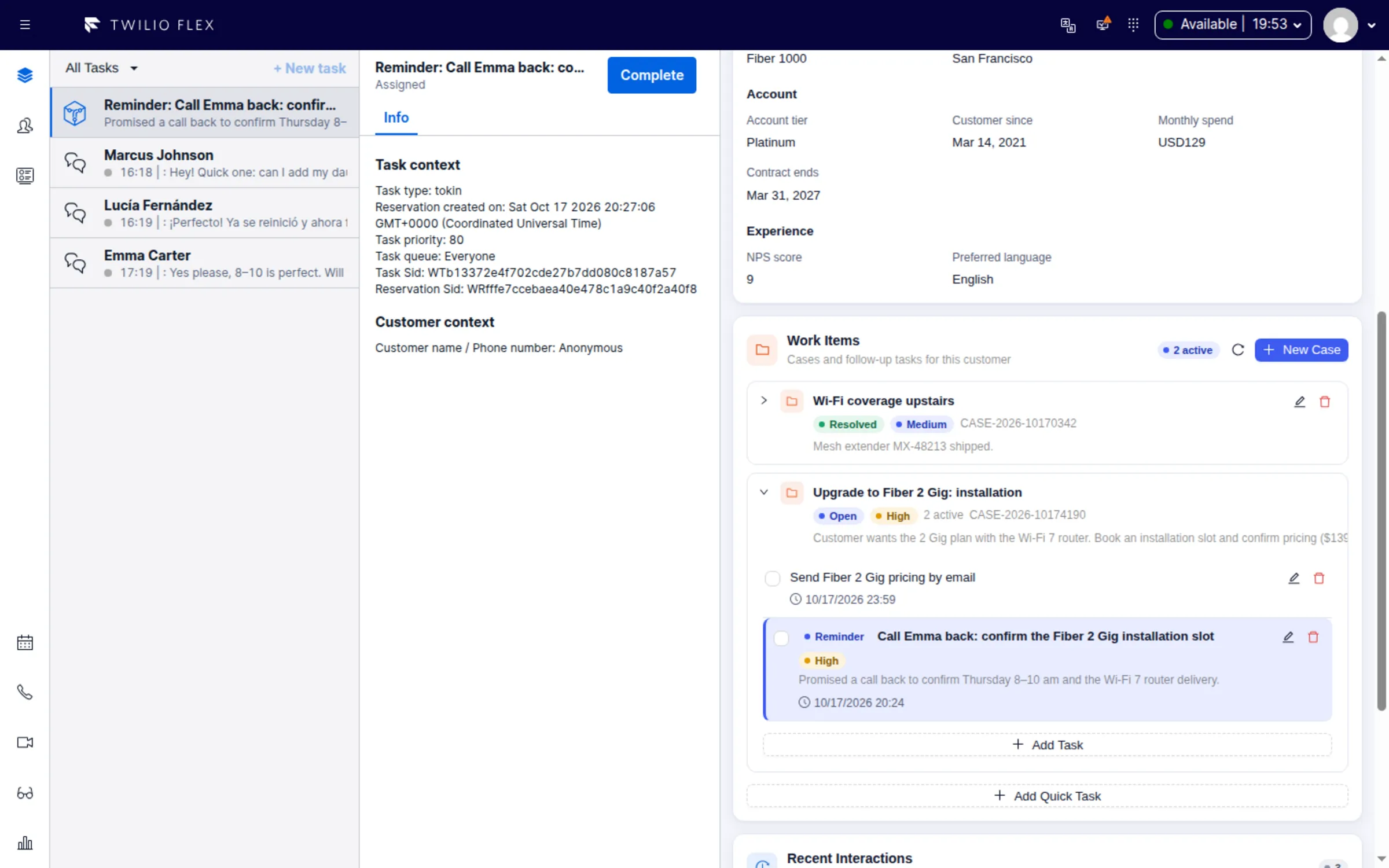
- Tasks and reminders. Follow-up tasks with a reminder date and time. At that moment the reminder arrives in Flex as a real task, routed to the assigned agent first and then to the queue.
- Interactions with AI insights. Every completed conversation, and every call with a recording, is stored on the customer's timeline with its transcript and an AI analysis: subject, summary, sentiment, outcome, topics and tags, from prompt templates your admins edit.
- Call, SMS and WhatsApp from the profile. Outbound buttons on the profile, with approved WhatsApp templates outside the 24-hour service window.
- CRM page for admins. Browse all interactions with AI filters, search customers by name, phone, email, alias or searchable custom field, and see follow-up tasks across the contact center, including overdue ones.
- English and Hebrew, with a right-to-left layout for Hebrew.
How it works
The CRM is part of the Floor Walker plugin for Twilio Flex. When a task opens, the plugin takes an identifier from it (the caller's number or address, the number dialled, the dialer lead's phone, or the customer ID on a reminder) and looks the customer up in Floor Walker with the agent's Flex session. There is no separate login, and what each user can see and change follows their Flex role.
Customers, contact channels, custom fields, interactions, cases and tasks are kept by the Floor Walker service, which we host for you in a dedicated environment or install in your own cloud or data center, so customer data never leaves your environment. Data is encrypted in transit and at rest. Floor Walker checks for due reminders every 15 seconds and creates a TaskRouter task for each one, so queues, capacity and reporting apply to reminders like any other task. Call transcripts come from Twilio call recordings or from the Floor Walker screen recorder's call audio, and the AI analysis uses the AI services configured for your installation.
Who it is for
- Contact centers on Twilio Flex that want agents to see who the customer is and what happened before, without switching to another tab.
- Teams serving the same customers over phone, SMS, WhatsApp and chat, who need those contacts tied to one person.
- Service teams that promise follow-ups ("call me back on Thursday") and need them to happen without anyone remembering.
- Organizations that want customer data kept in their own cloud or data center, or hosted for them.
Frequently asked questions
Can I have a CRM inside Twilio Flex without a separate CRM system?
Yes. Floor Walker keeps its own customer database and shows it inside Flex: the customer panel next to every task for agents, and a CRM page for admins with interactions, customers and tasks.
How does it recognize a customer who calls once and then writes on WhatsApp?
Each identifier is stored as an alias of one customer. Identifiers are normalized before matching: the whatsapp: prefix is removed and phone numbers are reduced to digits, so a WhatsApp message and a call from the same number match the same profile. Email addresses and other numbers can be added as aliases, and duplicate profiles can be merged.
How do follow-up reminders reach agents?
A task saved with a reminder comes back at that time as a Flex task titled "Reminder:" with the task's title, routed to the assigned agent for 5 minutes and then to any agent in the default queue. Accepting it opens the customer and highlights the task.
Can I add my own fields to the customer profile?
Yes. Admins define fields in CRM Settings without a deploy: twelve field types, groups shown as sections, required and searchable flags, options for dropdowns, and validation rules. Values are checked when a profile is saved.
Does the CRM show AI summaries of past conversations?
Yes. Each completed call or conversation is transcribed if needed and analyzed with your prompt template. Agents see the subject, sentiment, outcome and tags of the last 10 interactions next to the task and can open the full analysis or the transcript.
Can I import my existing customer list?
There is no bulk import or export of customers in the user interface today. Profiles are created automatically from incoming contacts and edited by agents and admins.
Learn more
- Agent Workspace overview
- Customer CRM
- Cases and tasks
- Interactions and AI insights
- Languages and right-to-left
Book a demo: hello@floorwalker.dev