AI summaries and insights for Twilio Flex conversations
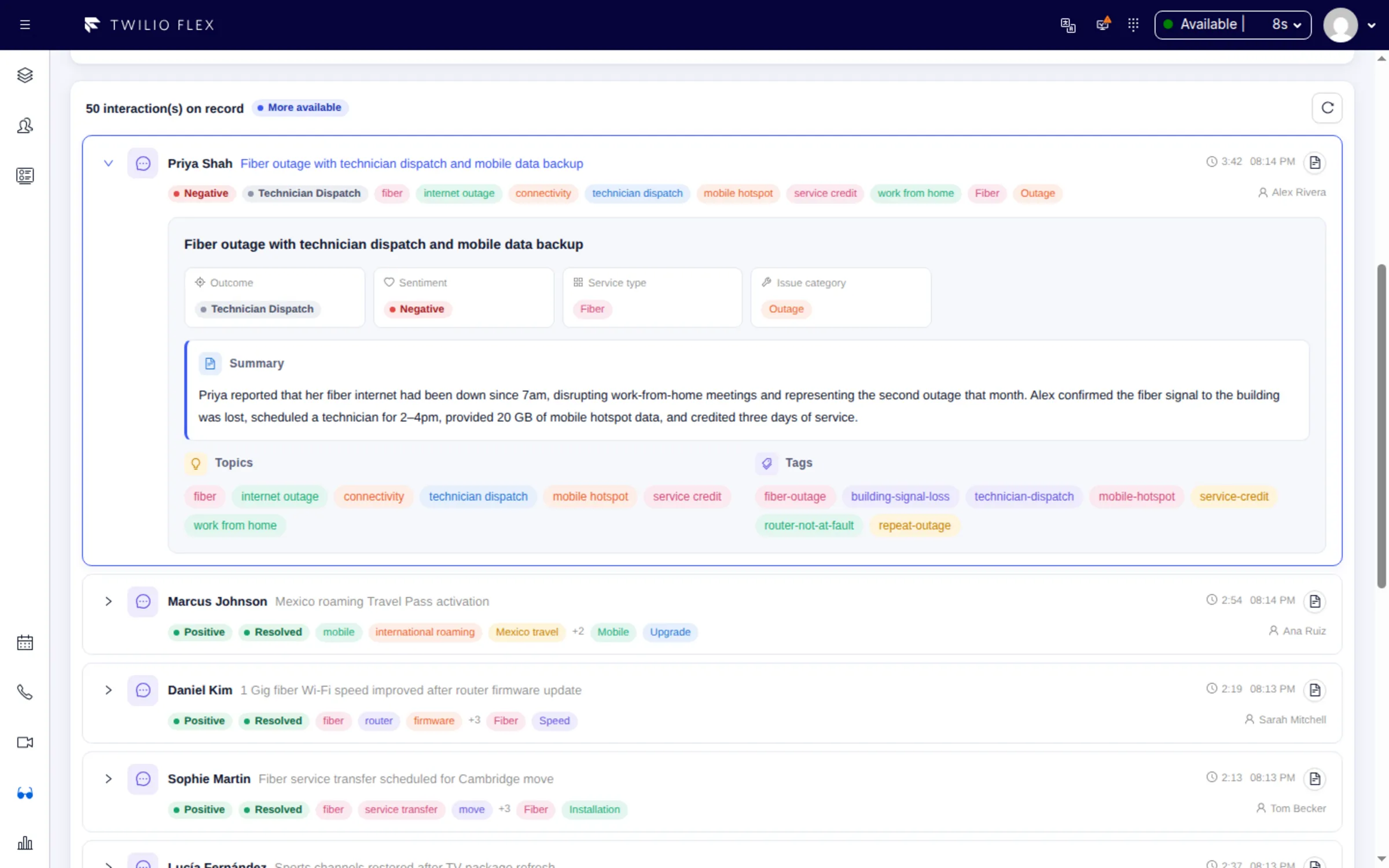
To get AI summaries of Twilio Flex calls and chats, install Floor Walker: when a task is completed, it transcribes the call or collects the conversation, runs it through a prompt your admins control, and stores a subject, summary, sentiment, outcome, topics and tags on the customer's timeline. Agents see the summaries next to the next task, and admins can search every interaction in the contact center by what the AI found.
What you get
- An analysis of every interaction. Each completed call, chat, SMS, WhatsApp or web chat conversation becomes an interaction with its transcript and an AI analysis. Agents do nothing extra.
- Call transcription with speaker separation. Calls are transcribed from Twilio call recordings, or from the audio the Floor Walker Screen Recorder captures during a call.
- Core fields plus your own. Subject, summary, sentiment, outcome and topics are always returned. Add custom fields of type string, array or enum, and choose the allowed values of sentiment and outcome.
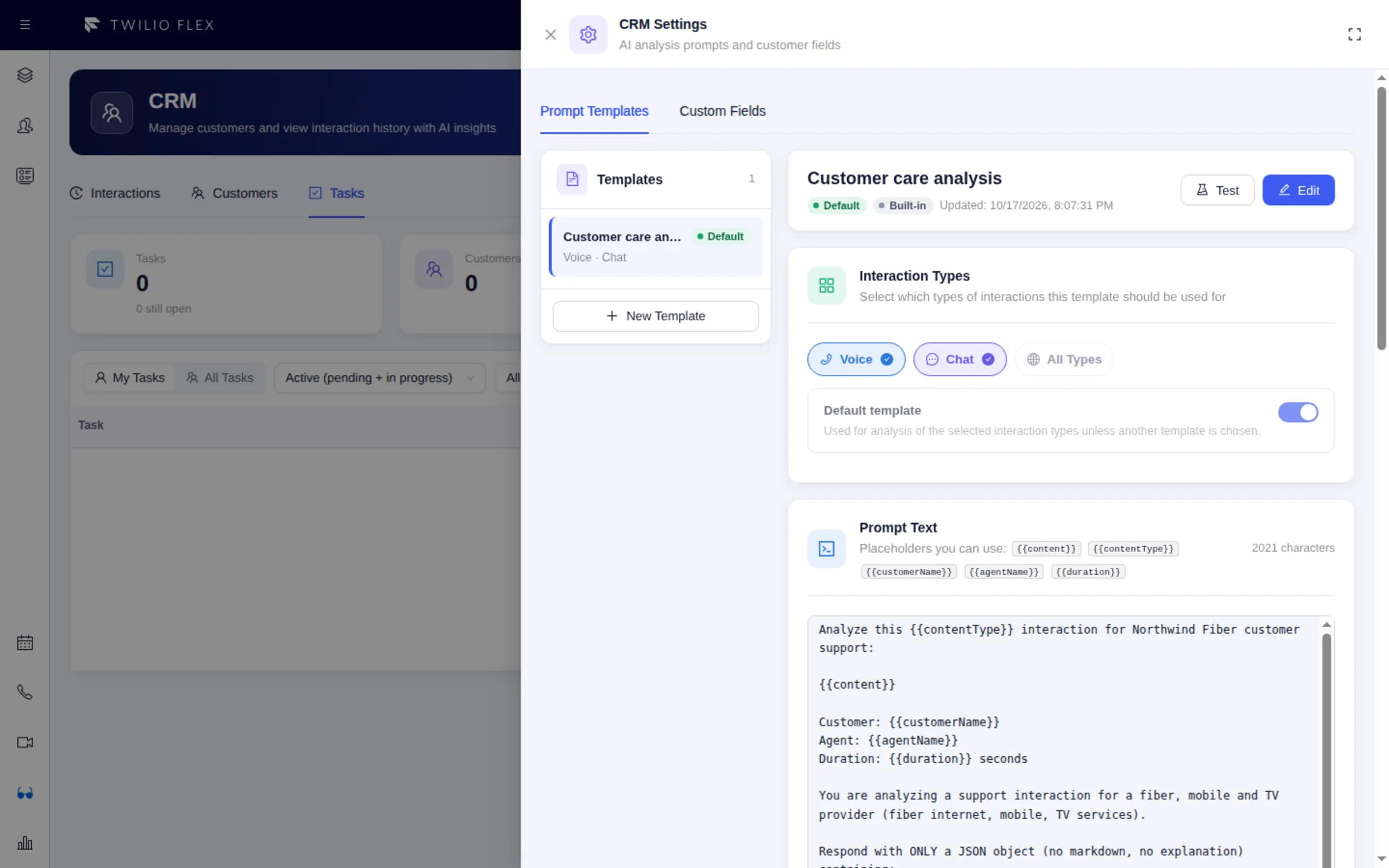
- Prompts you control. Admins edit prompt templates in Flex, with placeholders for the content, the customer's name, the agent's name, the call length and the message count. A template can cover voice, chat or both.
- Search across the whole floor. The Interactions tab filters by any filterable AI field (for example sentiment and outcome), by custom tag, agent, type and date range, and opens the transcript and the task's screen recording.
- History beside the task. The customer panel lists the customer's last 10 interactions with subject, sentiment, outcome and tags, so the agent knows what happened last time before saying hello.
- AI chosen for your installation. The AI services and the model are set for your installation, and each AI feature can be switched off. Ask us if you need a different model.
How it works
- A task is completed in Flex. For messaging tasks, up to 500 messages are collected from Twilio Conversations and labelled agent or customer. For calls, Floor Walker keeps a copy of the recording.
- Calls are transcribed. The audio is transcribed by the speech-to-text service configured for your installation, with the speakers separated.
- The prompt runs. The transcript is sent to the language model configured for your installation, with the matching prompt template. The model returns JSON, which is stored with the interaction and turned into searchable tags.
- The result shows up everywhere. The interaction appears on the customer's timeline, in the Interactions tab, in the Supervisor Console (unhappy customers in the last hour, recent conversations per agent) and in the AI metrics of Floor Walker Reports, such as negative sentiment rate and top topics.
The Flex plugin runs in your own Twilio Flex account. Transcripts, analyses and recordings are kept by the Floor Walker service, hosted for you or installed in your own cloud or data center, and encrypted in transit and at rest. See Your cloud or ours.
Who it is for
- Contact centers on Twilio Flex that want a summary of every call and chat without asking agents to write one.
- Quality and operations teams that need to find conversations by outcome, sentiment or topic across all agents.
- Admins who want the AI to return fields specific to their business, such as an issue category or a sales opportunity flag, and to filter on them.
FAQ
How do I get AI call summaries in Twilio Flex?
With Floor Walker installed on your Flex account, turn on call recording for Flex or use the Floor Walker Screen Recorder. Each finished call is transcribed and analysed, and the summary appears on the customer's timeline and in the Interactions tab.
Does it work for chat, SMS and WhatsApp, or only calls?
It works for both. Messaging conversations (chat, SMS, WhatsApp and web chat) are analysed when the task is completed, and calls are analysed once their recording is transcribed. Email tasks are not processed.
Can I change what the AI extracts from each conversation?
Yes. Admins edit the prompt and the output schema in Flex under CRM Settings. Custom fields marked filterable, with a list of values, become dropdown filters on the Interactions tab. The built-in template is written for a support center and can be edited to fit your business.
Which AI model does Floor Walker use for insights?
The AI services and the model are chosen for your installation; ask us if you need a different one. Each AI feature can be switched off or left out of your installation. See Security and data for how conversation data is handled.
What happens if the AI analysis fails?
The interaction is still stored with its transcript, without insights. If no AI service is configured for your installation, interactions are stored without insights.
Are old interactions re-analysed when I change a template?
No. A template change applies to new interactions only; there is no button to re-analyse existing ones.
Learn more
- Interactions and AI insights: prompt templates, filters and tags in detail
- Customer CRM: the customer panel where summaries appear
- Screen Recorder: call audio and screen recordings for each task
Book a demo: hello@floorwalker.dev